

Pricing details available on the official website, with different plans for varying needs.
Scanova
Scanova is a professional QR code generator and management platform designed to help businesses and marketers create, customize, track, and manage QR codes for marketing and operational campaigns.
Key features
- Over 20 QR code types
- Advanced customization options (colors, patterns, logo, frames)
- Dynamic QR codes with editable content
- Comprehensive scan analytics (location, device, time)
- Bulk QR code generation
- Centralized QR code management dashboard
- Password protection for content
- Lead generation forms integration
- API for custom integrations
- White-labeling options
- High-resolution vector downloads (SVG, EPS)
Pros & Cons
Pros
- Offers extensive customization for branding
- Dynamic QR codes allow content updates post-creation
- Detailed analytics provide actionable insights
- Supports a wide variety of QR code types for diverse use cases
- User-friendly interface for easy creation and management
- Scalable for both small businesses and large enterprises
- Reduces reprinting costs through dynamic codes
Cons
- Advanced features are behind a subscription paywall
- Requires internet access for dynamic QR code content and tracking
- Users need to ensure target audience familiarity with QR code scanning
What Is Scanova?
Scanova is a comprehensive, professional QR code generator and management platform. It is designed to assist businesses, marketers, and individuals in creating, customizing, tracking, and managing QR codes for a wide array of marketing, operational, and informational campaigns. Essentially, Scanova transforms static information into dynamic, scannable codes, providing robust tools to ensure these codes are not only visually appealing but also highly functional and measurable.
The platform goes beyond simple QR code generation, offering features for advanced customization, performance tracking, and secure management. This makes it an invaluable tool for anyone looking to integrate QR codes effectively into their digital and print strategies, from small businesses to large enterprises.
How Does Scanova Work?
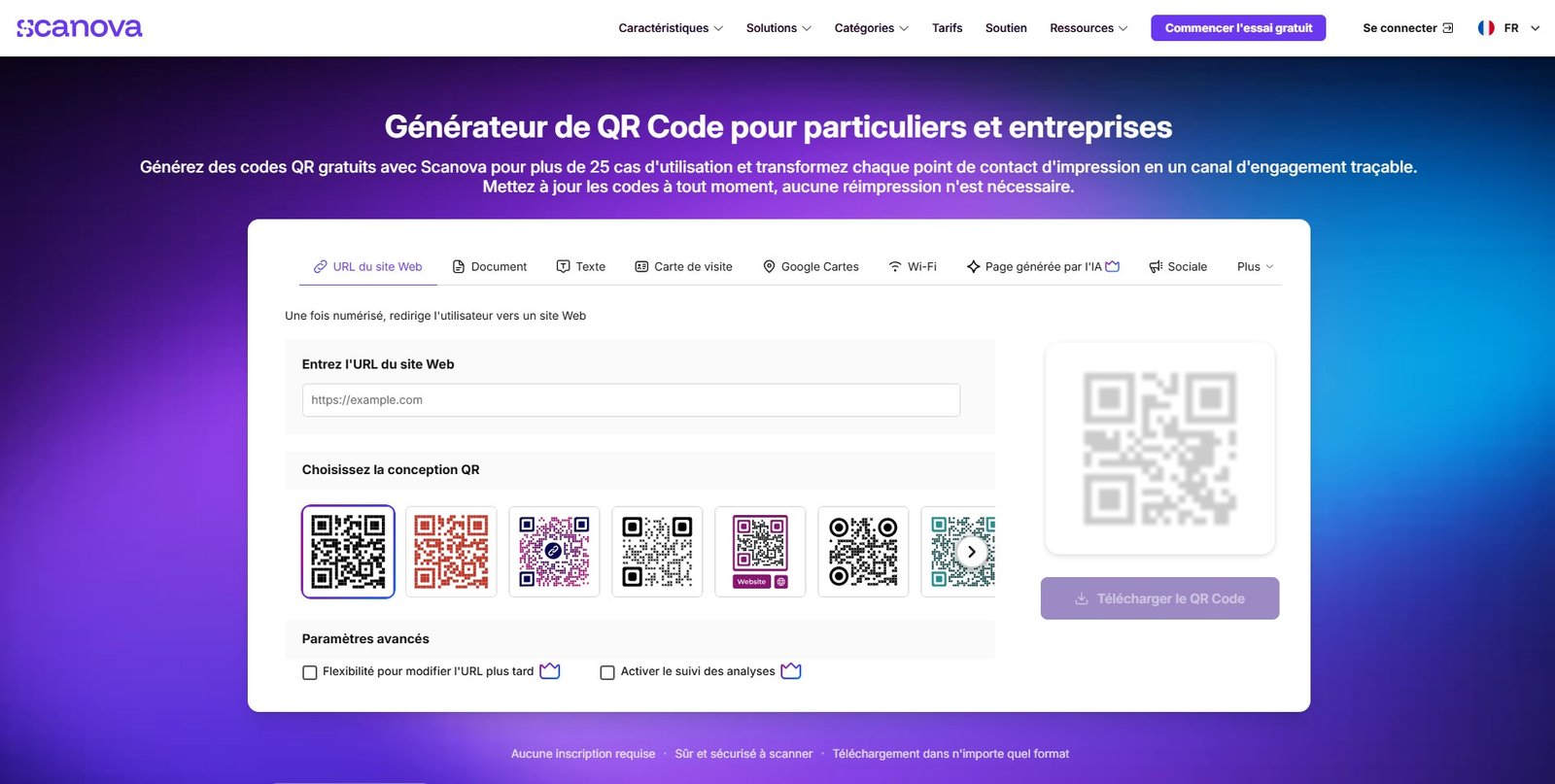
Scanova operates through a user-friendly web interface, guiding users through the process of creating and managing QR codes. The core workflow involves several key steps:
- Choosing a QR Code Type: Users first select the type of content they want their QR code to link to. This could be a website URL, vCard, PDF, app download link, Wi-Fi network, email, SMS, or even multimedia content.
- Inputting Content: Depending on the chosen type, users input the relevant data (e.g., a URL, contact details, text).
- Customization: This is where Scanova shines. Users can extensively customize the appearance of their QR codes, including colors, shapes, patterns, frames, and even adding a logo. This ensures the QR code aligns with branding guidelines.
- Generating and Downloading: Once customized, the QR code is generated and can be downloaded in various formats suitable for print or digital use (e.g., PNG, JPG, SVG, EPS).
- Tracking and Management: For dynamic QR codes, Scanova provides a dashboard to track scan analytics (location, time, device type) and allows users to update the linked content without changing the QR code itself. This is crucial for campaigns that require flexibility and performance measurement.
The platform supports both static and dynamic QR codes, with dynamic codes offering the significant advantage of editable content and tracking capabilities post-creation.
Key Features of Scanova
Scanova offers a rich set of features designed to cater to diverse QR code needs:
- Multiple QR Code Types: Supports over 20 different QR code categories, including Website URL, vCard, PDF, App Store, Wi-Fi, Event, Google Maps, Social Media, and more.
- Customization Options: Advanced design tools for changing colors, patterns, eyes, adding logos, custom backgrounds, and frames to ensure brand consistency.
- Dynamic QR Codes: Create QR codes whose content can be changed anytime, even after printing, without needing to generate a new code. This is essential for adaptable campaigns.
- Scan Analytics: Comprehensive tracking of scan data, including scan location, time, device used, and unique vs. total scans. This provides valuable insights into campaign performance.
- Bulk QR Code Generation: Ability to create multiple QR codes simultaneously, ideal for large-scale operations or personalized campaigns.
- QR Code Management: A centralized dashboard to organize, edit, and manage all created QR codes, facilitating easy updates and monitoring.
- Password Protection: Secure QR codes by adding password protection to the linked content.
- Lead Generation Forms: Integrate lead capture forms directly into QR code campaigns.
- API for Integration: An API is available for developers to integrate Scanova’s QR code generation capabilities into their own applications or workflows.
- White Labeling: For business plans, options to remove Scanova branding and use custom domains for landing pages.
- High-Resolution Downloads: Download QR codes in vector formats (SVG, EPS) for high-quality printing without pixelation.
Main Use Cases for Scanova
Scanova’s versatility makes it suitable for numerous applications across various industries:
- Marketing Campaigns: Drive traffic to websites, landing pages, social media profiles, or promotional videos from print ads, billboards, flyers, and product packaging.
- Business Cards & Networking: Create vCard QR codes for instant contact information sharing, streamlining networking events.
- Product Packaging & Labels: Provide instant access to product manuals, nutritional information, recipes, warranty registration, or customer support.
- Event Management: Facilitate event registration, provide venue maps, share schedules, or gather feedback through event-specific QR codes.
- Restaurant Menus: Replace physical menus with digital, scannable menus, allowing for easy updates and hygiene.
- Real Estate: Link property listings, virtual tours, or agent contact information on ‘for sale’ signs or brochures.
- Education: Share study materials, assignments, or library resources with students.
- Inventory Management: Use QR codes to track assets, manage stock, or streamline logistics.
- Customer Feedback & Surveys: Direct customers to feedback forms or surveys to gather valuable insights.
- Wi-Fi Access: Simplify Wi-Fi network access for guests in offices, cafes, or hotels.
Who Is Scanova Best Suited For?
Scanova is ideal for a broad range of users and organizations:
- Marketing Professionals & Agencies: Those running multi-channel campaigns who need robust tracking and dynamic content capabilities.
- Small to Medium-Sized Businesses (SMBs): Companies looking for an affordable yet powerful way to enhance their marketing, improve customer engagement, and streamline operations.
- Large Enterprises: Organizations requiring advanced features like bulk generation, API integration, and white-label options for extensive use cases.
- Graphic Designers & Printers: Professionals who need high-quality, customizable QR codes for client projects.
- Event Organizers: Individuals or teams managing events who need efficient ways to disseminate information and engage attendees.
- Retail & Hospitality Businesses: Establishments looking to modernize customer interactions, provide digital menus, or simplify information access.
- Anyone Needing Measurable Offline-to-Online Bridges: Essentially, anyone who wants to connect physical materials with digital content in a trackable and manageable way.
Benefits and Practical Advantages of Using Scanova
Choosing Scanova for your QR code needs offers several distinct advantages:
- Enhanced Engagement: QR codes provide a quick and easy way for users to access digital content, boosting engagement with print materials.
- Brand Consistency: Extensive customization options allow QR codes to seamlessly integrate into existing branding, reinforcing identity.
- Flexibility & Adaptability: Dynamic QR codes mean content can be updated at any time, making campaigns adaptable and future-proof without costly reprints.
- Actionable Insights: Detailed scan analytics provide crucial data on campaign performance, enabling data-driven decision-making and optimization.
- Cost-Effectiveness: By allowing content updates without reprinting, dynamic QR codes can significantly reduce marketing costs.
- Professional Appearance: High-resolution downloads ensure that QR codes look crisp and professional in any medium.
- Security: Features like password protection add an extra layer of security for sensitive information.
- Scalability: From single QR codes to bulk generation and API integrations, Scanova can scale with your business needs.
- User-Friendly Interface: The platform is designed to be intuitive, allowing users to create and manage QR codes efficiently without extensive technical knowledge.
Limitations or Considerations
While Scanova is a powerful tool, it’s important to consider some aspects:
- Reliance on Internet Access: For dynamic QR codes, the linked content requires an active internet connection to be accessed.
- User Adoption: While QR codes are widely recognized, some audiences might still be unfamiliar with scanning them, requiring brief instructions.
- Subscription Model: Access to advanced features like dynamic codes, analytics, and bulk generation typically requires a paid subscription.
- Feature Overload for Basic Users: For users who only need a single, static QR code with no tracking, some of Scanova’s advanced features might be more than necessary.
Pricing & Plans
Scanova typically offers various pricing plans tailored to different user needs, usually ranging from basic to enterprise-level subscriptions. These plans often differ in the number of dynamic QR codes allowed, scan limits, access to advanced features (like white-labeling or API), and the depth of analytics provided. For the most current and detailed pricing information, including any free trial options, it is best to visit the official Scanova website.
Integrations & Compatibility
Scanova is primarily a web-based platform, accessible via any modern web browser. Its API allows for integration with other software and systems, enabling developers to incorporate QR code generation and management directly into their custom applications or workflows. This flexibility makes it compatible with a wide range of digital environments.
How to Get Started with Scanova
Getting started with Scanova is a straightforward process:
- Visit the Official Website: Navigate to the Scanova homepage.
- Sign Up/Create an Account: If you don’t have an account, you’ll need to register. Scanova often offers a free trial to explore its features.
- Choose Your QR Code Type: From the dashboard, select the type of content you want to embed in your QR code.
- Input Data & Customize: Enter the necessary information and then personalize your QR code’s design to match your brand.
- Generate & Download: Once satisfied, generate your QR code and download it in your preferred format.
- Deploy & Track: Use your QR code in your campaigns and monitor its performance through the Scanova dashboard.
Practical Tips for Better Results with Scanova
- Always Use Dynamic QR Codes: Even if you think your content won’t change, dynamic codes offer the flexibility to update information and, crucially, provide scan analytics.
- Test Your QR Codes: Before printing or widespread deployment, scan your QR code with various devices and QR code readers to ensure it works correctly and links to the intended content.
- Include a Call to Action: Add a clear instruction near your QR code, such as “Scan for our menu” or “Scan for details,” to encourage users to interact.
- Optimize Landing Pages: Ensure the content linked by your QR code is mobile-friendly and provides a good user experience.
- Monitor Analytics Regularly: Use Scanova’s analytics dashboard to understand how your QR codes are performing and make data-driven adjustments to your campaigns.
- Brand Your QR Codes: Leverage Scanova’s customization options to integrate your logo and brand colors into the QR code for a professional and trustworthy appearance.
- Consider Placement: Place QR codes in easily scannable locations with good lighting and sufficient space around them.
Frequently Asked Questions
What is the difference between a static and a dynamic QR code?
A static QR code directly embeds the destination data into the code itself. Once generated, its content cannot be changed, and it typically doesn’t offer scan tracking. A dynamic QR code, on the other hand, contains a short URL that redirects to your actual content. This means you can change the linked content anytime without generating a new QR code, and it allows for detailed scan analytics.
Can I add my company logo to a Scanova QR code?
Yes, Scanova offers extensive customization options, including the ability to add your company logo to the center of your QR codes. This helps in branding and makes the QR code more recognizable and trustworthy.
Is Scanova suitable for large-scale business use?
Absolutely. Scanova provides features like bulk QR code generation, API integration, and white-labeling options, making it well-suited for businesses with high-volume QR code needs or those looking to integrate QR code functionality into their existing systems.
What kind of analytics does Scanova provide?
Scanova offers comprehensive scan analytics for dynamic QR codes. This includes data on the total number of scans, unique scans, scan locations (city, country), device types used (iOS, Android), and the time of scans. These insights are crucial for evaluating campaign effectiveness.
Are the QR codes generated by Scanova permanent?
Static QR codes are permanent as long as the linked content (if any) remains active. Dynamic QR codes are permanent in terms of their scannability, but their linked content can be changed at any time through your Scanova dashboard, offering greater flexibility.
Empower Your Campaigns with Scanova
Scanova stands out as a robust and versatile QR code generator and management platform, offering far more than just basic code creation. Its emphasis on customization, dynamic content, and actionable analytics makes it an indispensable tool for businesses and marketers aiming to bridge the gap between physical and digital interactions effectively. Whether you’re looking to enhance a marketing campaign, streamline operations, or simply provide more accessible information, Scanova offers the features and flexibility to achieve your goals.
By leveraging its powerful suite of tools, you can create professional, branded, and trackable QR codes that drive engagement and provide valuable insights. Explore Scanova today to transform your strategies and connect with your audience in new and dynamic ways.
Ready to create your professional QR codes? Visit the Scanova website to get started or learn more about their offerings.
Display your featured badge
Copy this badge into your website footer. Visitors who click it will open this listing page.

Integrations
Related tools


GoHighLevel
Business Software
Pricing details available on official website, typically subscription-based.