

Credit-based or subscription plans available; e.g., $3.6 / 30s for Seedance 2.5
Topview AI
Topview AI is an AI-powered video creation platform designed for marketing, e-commerce, and content creators to produce high-quality short films and marketing videos without extensive filmmaking expertise.
Key features
- AI Video Agent
- Agent-Driven Canvas
- Drama Studio for micro-dramas
- 3D Shot Composer
- Reference Video Recreation
- UGC-Style Ad Generation
- Social Media Content Batch Creation
- URL to Marketing Video conversion
- AI Image Generation (GPT Image 2)
- AI Avatar & Voice capabilities
- Multi-Language Localization (30+ languages)
- Team Collaboration features
Pros & Cons
Pros
- Significantly reduces video production time and costs
- Accessible for users without advanced filmmaking skills
- Enables scalable production of diverse video content
- Maintains brand and character consistency across videos
- Optimizes content for various social media platforms
- Offers extensive localization capabilities for global reach
- Integrated workflow eliminates need for multiple tools
Cons
- Nuanced creative control may still require human input
- Quality dependent on underlying AI models
- May have a learning curve for advanced features
- Originality can be limited compared to human creativity
- Ethical considerations with AI-generated content
What Is Topview AI?
Topview AI (also known as Topview.ai) is an advanced artificial intelligence video creation and editing platform. It serves as an AI Video Agent, empowering businesses, e-commerce sellers, and content creators to rapidly produce marketing videos, short films, and social media content without requiring specialized filmmaking skills. The platform streamlines the video production workflow from idea generation to final output, leveraging AI to plan scenes, select models, generate assets, and maintain consistency across various video formats.
Unlike single-purpose AI video generators, Topview AI aims to provide a comprehensive creative workspace. It integrates multiple AI capabilities, including video generation, image creation, avatar and voice synthesis, and localization, into a single agent-driven system. This allows users to input ideas through descriptions, scripts, reference videos, or product URLs, and the AI agent then orchestrates the entire production process.
How Does Topview AI Work?
Topview AI operates on an “agent-first” principle, meaning an intelligent AI agent guides the video creation process from start to finish. Here’s a breakdown of its workflow:
- Idea Input: Users begin by describing their video idea, providing a script, uploading a reference video, or pasting a product URL. This input serves as the creative brief for the AI agent.
- Scene Planning & Asset Generation: The AI agent then interprets the input to plan scenes, select appropriate AI models (for video, image, avatar, voice), and generate necessary assets such as images, characters, and initial video clips.
- Agent-Driven Canvas: The core of the creation process happens on the “Canvas.” This interactive workspace allows users to collaborate with the AI agent. The agent proposes scenes, creates assets, executes the production flow, and helps maintain consistency in voice, characters, and visual identity across multi-shot videos. Users retain editorial control, able to edit every shot.
- Specialized Studios: For more specific needs, Topview offers dedicated tools like “Drama Studio” for micro-drama production with consistent characters and narratives, and a “3D Shot Composer” for staging scenes and controlling camera angles before full generation.
- Multi-Format Output: The platform is designed to adapt content for various platforms, including TikTok, Instagram Reels, YouTube Shorts, and traditional marketing video formats, ensuring optimal aspect ratios and pacing.
- Localization: Topview AI supports localization across over 30 languages, enabling the addition of presenters, voiceovers, and captions for global campaigns.
This agent-driven approach aims to bridge the gap between simple AI asset generation and complex manual production, offering a more integrated and efficient workflow for diverse creative needs.
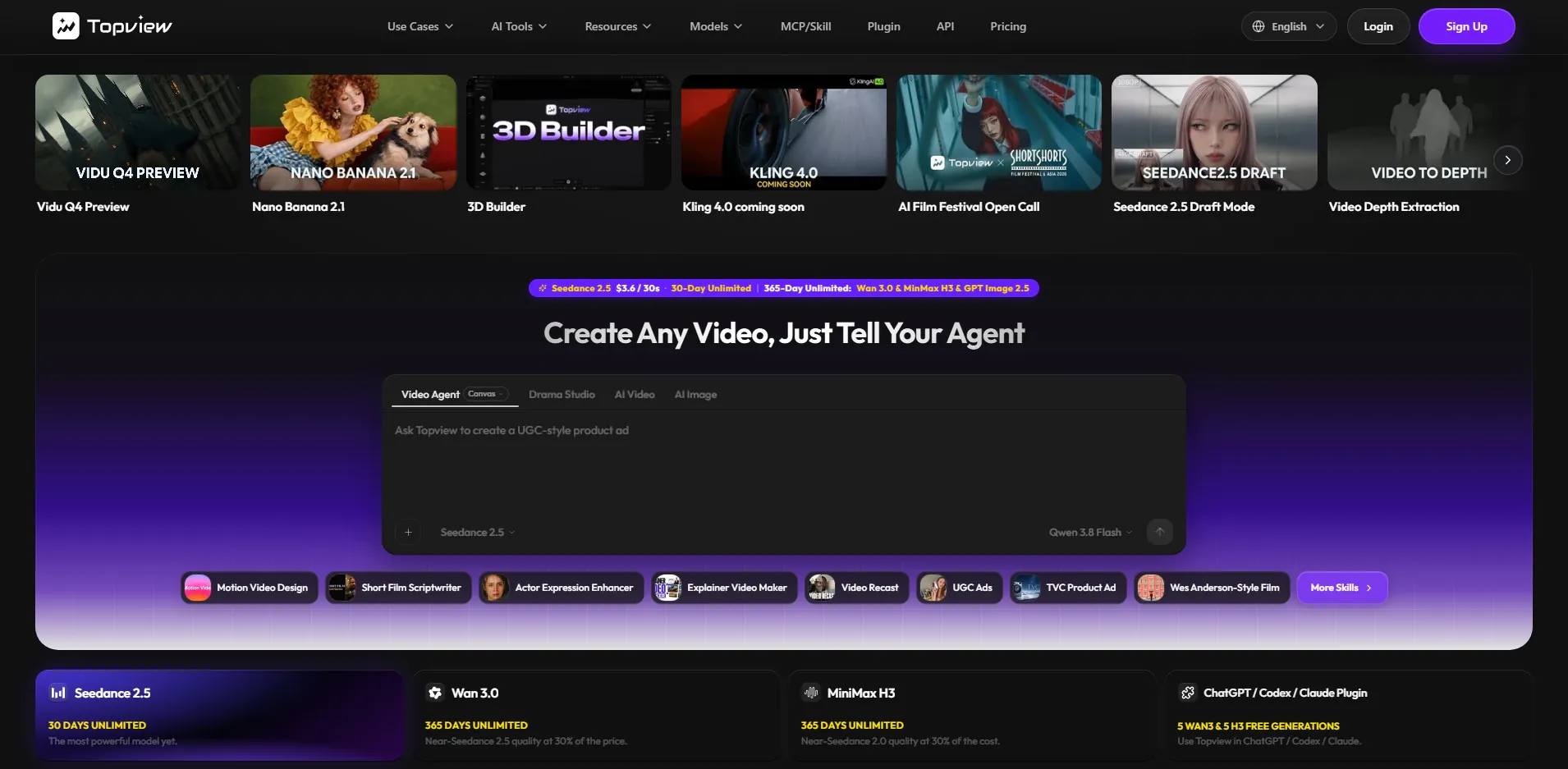
Key Features of Topview AI
Topview AI bundles a range of powerful features designed to streamline and enhance video production:
- AI Video Agent: An intelligent agent that plans scenes, selects models, generates assets, and guides the video creation process from text, script, reference video, or URL input.
- Agent-Driven Canvas: An interactive visual workspace for free-form video creation, allowing users to collaborate with the AI agent, edit shots, and ensure consistency.
- Drama Studio: A specialized tool for creating micro-dramas, mini-dramas, vertical dramas, and short-form series with consistent characters, scenes, visuals, and sound.
- 3D Shot Composer: Enables users to place characters and props in a 3D scene, adjust virtual camera angles, and generate consistent AI video shots from multiple perspectives.
- Reference Video Recreation: Analyze and clone the style, pacing, shot structure, and camera language of existing videos to create new content.
- UGC-Style Ad Generation: Create realistic user-generated content (UGC) style ads with AI presenters, natural hooks, and product storytelling for social media platforms.
- Social Media Content Batch Creation: Generate multiple short-form videos optimized for TikTok, Reels, and Shorts from a single idea or asset set, maintaining brand voice.
- URL to Marketing Video: Transform a product URL or campaign brief directly into a polished marketing video, explainer, or product ad.
- Image Generation (GPT Image 2): Create thumbnails, product imagery, character references, and scene concepts that can be integrated into video production.
- Voice & Avatar Capabilities: Add AI presenters, voiceovers, and utilize character swap features to customize video narration and on-screen talent.
- Multi-Language Localization: Support for over 30 languages for voiceover, captions, and localized creative variants.
- Team Collaboration: Features for sharing projects, credits, and assets across teams, with admin controls for usage and organization.
Main Use Cases for Topview AI
Topview AI is versatile, catering to a broad spectrum of video creation needs. Its primary use cases include:
Marketing Video Production
For marketers and e-commerce businesses, Topview AI simplifies the creation of various promotional content. This includes:
- Product Ads: Quickly generate conversion-focused product advertisements from a product URL or brief.
- UGC-Style Ads: Produce authentic-looking user-generated content ads for platforms like TikTok, Instagram, and Meta.
- Launch Videos: Create engaging launch videos for new products or services.
- Explainer Videos: Develop clear and concise explainer videos to demonstrate product features or concepts.
Short Film & Drama Creation
Filmmakers and content creators focused on narrative content can leverage Topview AI for:
- Cinematic Short Films: Turn story ideas or scripts into cinematic shots with control over camera movement, lighting, and mood.
- Micro-Dramas & Vertical Dramas: Produce short, episodic content with consistent characters and storylines, ideal for platforms like YouTube Shorts or TikTok.
- Scene Generation: Create individual film scenes from a script or visual reference, acting as an AI film generator.
Social Media Content Creation
Topview AI is particularly useful for generating high volumes of content for social platforms:
- Viral Reels & TikToks: Transform raw clips or ideas into viral-ready short videos optimized for vertical formats.
- Batch Content Creation: Efficiently produce multiple variations of short videos for A/B testing and diverse campaigns.
- Content Adaptation: Clone the style and pacing of trending videos to adapt them for specific brands or products.
Visual Asset Design
Beyond video, Topview AI also assists with related visual assets:
- Product Posters & Key Visuals: Design high-quality product posters and campaign key visuals.
- Social Graphics: Generate clean and impactful graphics for social media posts.
- Storyboards & Scene Concepts: Create visual storyboards and concept art that feed directly into video production.
Who Is Topview AI Best Suited For?
Topview AI is designed for a diverse range of users who need efficient and scalable video production without the complexities of traditional filmmaking:
- E-commerce Businesses: Ideal for online retailers who need to create a constant stream of product videos, ads, and social media content to drive sales.
- Marketing Agencies: Agencies can leverage Topview AI to rapidly produce diverse video campaigns for multiple clients, test creative concepts, and scale their video production services.
- Content Creators & Influencers: Individuals and small teams looking to produce engaging short films, micro-dramas, or consistent social media content for platforms like TikTok, Instagram, and YouTube.
- Small to Medium-sized Businesses (SMBs): Companies without large in-house video production teams can use Topview AI to create professional-quality marketing materials affordably.
- Film & Creative Studios: Even professional studios can use Topview AI for rapid prototyping, generating scene concepts, pre-visualization, and creating supplementary content.
- Anyone without Extensive Video Editing Skills: The platform’s AI agent simplifies complex tasks, making it accessible to users who are not professional videographers or editors.
Benefits and Practical Advantages of Using Topview AI
Leveraging Topview AI offers several significant advantages for video creators and marketing teams:
- Speed and Efficiency: Drastically reduces the time required for video production, allowing for rapid iteration and deployment of campaigns. This means faster turnaround times for marketing initiatives and content releases.
- Cost Reduction: Minimizes the need for expensive equipment, elaborate sets, actors, and extensive post-production, leading to substantial cost savings compared to traditional video production.
- Accessibility: Lowers the barrier to entry for high-quality video creation. Users don’t need advanced filmmaking skills or technical knowledge to produce professional-looking videos.
- Scalability: Enables the production of a large volume of diverse video content, which is crucial for extensive marketing campaigns, social media presence, and A/B testing.
- Consistency: The AI agent helps maintain brand voice, character consistency, and visual style across multiple videos and formats, which is essential for brand identity.
- Creative Exploration: Facilitates experimentation with different creative ideas, styles, and narratives through quick generation and iteration.
- Multi-Platform Optimization: Automatically adapts videos for various social media platforms, ensuring content looks good and performs well on TikTok, Reels, Shorts, and other channels.
- Localization Capabilities: Opens up global markets by easily translating and localizing video content into over 30 languages, including voiceovers and captions.
- Integrated Workflow: Provides a unified workspace for planning, generation, refinement, and adaptation across different media types (video, image, audio), eliminating the need to juggle multiple single-purpose tools.
Limitations or Considerations
While Topview AI offers powerful capabilities, potential users should consider certain aspects:
- Creative Control Nuances: While the platform offers editable shots on Canvas, highly specific artistic visions or nuanced creative directions might still require more hands-on human intervention than a fully automated AI agent can provide.
- AI Model Dependence: The quality and style of generated content are dependent on the underlying AI models (e.g., Seedance, Wan, MiniMax H3, GPT Image 2.5). Users should be aware of the capabilities and limitations of these models.
- Learning Curve: Although designed for ease of use, mastering the full range of features, especially the agent-driven Canvas and Drama Studio, may still involve a learning curve for new users to achieve optimal results.
- Originality vs. Replication: While excellent for cloning styles and generating variations, creating truly groundbreaking, unique visual narratives that push creative boundaries might still benefit from human ingenuity and direction.
- Ethical Considerations: As with all AI-generated content, users should be mindful of ethical implications, especially concerning deepfakes, copyright, and responsible use of AI-generated avatars and voices.
Pricing and Plans
Topview AI offers flexible pricing options based on usage and access to different AI models. While exact pricing tiers can vary, the model appears to be credit-based or subscription-based, often tied to generation time or specific model access.
- Seedance 2.5: Priced at approximately $3.6 per 30 seconds of video generation, with options for 30-day unlimited or 365-day unlimited access. This is described as the most powerful model.
- Wan 3.0: Offers near-Seedance 2.5 quality at a reduced cost, with a 365-day unlimited option.
- MiniMax H3: Provides near-Seedance 2.0 quality at an even lower cost, also with a 365-day unlimited option.
- Free Generations: Users may receive free generations, such as 5 WAN3 and 5 H3 generations, often through integrations like the ChatGPT / Codex / Claude Plugin.
For the most current and detailed pricing information, including specific plan inclusions and any trial offers, it is recommended to visit the official Topview AI website.
Integrations and Compatibility
Topview AI is designed to integrate with other platforms and tools to enhance its functionality:
- ChatGPT / Codex / Claude Plugin: Allows users to leverage Topview’s video generation capabilities directly within these large language models, suggesting a plugin-based integration for workflow efficiency.
- Blender Plugin: Mentioned as “Plugin Blender,” suggesting potential integration or compatibility with Blender, a popular 3D creation suite, which could enhance 3D asset generation or scene staging.
- API Access: Topview offers an API, enabling developers and businesses to integrate Topview’s AI video generation capabilities into their own applications and workflows.
The platform is generally web-based, making it accessible across various operating systems and devices through a web browser. It also features a mobile app, “Topview: Marketing Video Agent,” available on platforms like Google Play, indicating broader compatibility for on-the-go creation.
How to Get Started with Topview AI
Getting started with Topview AI typically involves a straightforward process:
- Visit the Website: Navigate to the official Topview AI website.
- Sign Up/Log In: Create an account or log in if you already have one. There may be options for free generations or a trial to explore the platform.
- Choose Your Creation Mode: Decide whether you want to create a marketing video, a short film, social media content, or use a specific studio like Canvas or Drama Studio.
- Provide Your Input: Start by describing your idea, uploading a script, providing a reference video, or pasting a product URL.
- Collaborate with the AI Agent: The AI agent will then begin to plan scenes and generate initial assets. Utilize the Canvas to refine and edit the video, guiding the AI as needed.
- Generate and Export: Once satisfied with the output, generate the final video and export it in the desired format for your intended platform.
The platform’s intuitive interface and agent-driven workflow are designed to guide users through each step, making complex video production accessible even for beginners.
Practical Tips for Getting Better Results with Topview AI
To maximize your output and achieve the best results with Topview AI, consider these practical tips:
- Be Specific with Your Prompts: The more detailed and clear your initial idea or script, the better the AI agent can understand and execute your vision. Include specifics about mood, style, characters, and desired actions.
- Utilize Reference Videos: If you have a particular style, pacing, or aesthetic in mind, leverage the reference video recreation feature. Uploading a strong example can significantly guide the AI.
- Iterate on the Canvas: Don’t settle for the first generation. Use the Canvas to refine scenes, adjust elements, and experiment with different assets. The iterative process is key to achieving desired outcomes.
- Experiment with Models: If available, try different AI models (e.g., Seedance, Wan) for various tasks. Some models might be better suited for cinematic motion, while others excel at specific visual styles.
- Focus on the Core Message: Especially for marketing videos, keep your message concise and clear. The AI can help with execution, but a strong core concept is always paramount.
- Optimize for Platform: When creating for social media, remember the specific requirements and best practices for each platform (e.g., vertical video for TikTok/Reels, punchy hooks). Topview’s tools can help adapt content effectively.
- Team Collaboration: If working in a team, utilize the collaboration features to share ideas, review outputs, and streamline the feedback process.
- Review and Edit: Always review the AI-generated content critically. While powerful, AI is a tool, and human oversight is crucial for quality control and final polish.
Frequently Asked Questions
What is the core difference between Topview AI and other AI video tools?
Topview AI distinguishes itself by offering an “AI Video Agent” system rather than just single-purpose generators. This agent plans, generates, compares, refines, and adapts content across video, image, and social formats, providing a more integrated and end-to-end production workflow from a single workspace.
Can Topview AI create videos with consistent characters and storyline?
Yes, Topview AI’s Drama Studio is specifically designed to create micro-dramas and short-form series with consistent characters, scenes, visuals, and sound. The agent helps plan continuity and dialogue to maintain narrative coherence across episodes or multiple shots.
Is Topview AI suitable for beginners without video production experience?
Absolutely. Topview AI is built to democratize video creation. Its agent-driven interface and intuitive Canvas allow beginners to produce professional-quality videos by guiding them through the process, minimizing the need for specialized video production skills.
Can I use my own assets or product URLs with Topview AI?
Yes, Topview AI allows users to input their ideas through various means, including scripts, reference videos, and product URLs. This enables the AI agent to incorporate specific product information or creative styles into the generated content.
What kind of videos can I localize with Topview AI?
Topview AI supports localization for voiceover, captions, and localized creative variants across more than 30 languages. This makes it ideal for adapting marketing videos, product explanations, and social media content for global audiences.
Unleash Your Creative Vision with Topview AI
Topview AI stands out as a powerful and comprehensive AI Video Agent, transforming the landscape of video creation for marketing, e-commerce, and creative storytelling. By integrating an intelligent agent with a versatile workspace like the Canvas and specialized studios such as Drama Studio, it empowers users to produce a wide array of video content from cinematic short films and engaging marketing ads to viral social media clips with unprecedented speed and efficiency.
Whether you’re an experienced marketer looking to scale content production, an e-commerce entrepreneur aiming to boost product visibility, or an aspiring filmmaker bringing stories to life, Topview AI offers the tools to translate your ideas into high-quality video without the traditional complexities. Explore its capabilities and redefine your video creation workflow by visiting the official Topview AI website today.
Topview AI Website Analytics
Topview AI Website Insights
Topview AI Status
| Status | Online |
|---|---|
| Uptime (30 days) | 100.00% |
| Avg. Response Time | 246 ms |
| Last Checked | 27 minutes ago |
Response time over the last 30 days · red lines = downtime
Domain: topview.ai
| SSL Certificate | Let's Encrypt, valid until 2026-12-14 |
|---|---|
| Security | HTTPS + HSTS |
| Server | Vercel |
| Language | en |
Technology
Social Profiles
Display your featured badge
Copy this badge into your website footer. Visitors who click it will open this listing page.

Integrations
Related tools






Scanova
QR Code Tools
Pricing details available on the official website, with different plans for varying needs.