BIGSPY AI Connect is a Windows desktop workspace for bringing AI conversations, project tasks, model connections, and independent review into one organized workflow. AI Connect helps you keep the request, the answer, and the review history together, so you can inspect what happened and decide what to do next. Its desktop preview combines practical task organization with a longer-term vision for coordinated agents: Big Boss receives goals, Mini Boss coordinates work, and Cute Boss reviews results.
01 / THE WORKSPACE
What is BIGSPY AI Connect?
Working with AI often means switching between separate chats, remembering which model produced an answer, and manually checking whether the result meets your request. BIGSPY AI Connect is designed to make that work easier to organize. A project provides the wider context, a Mini Boss session groups the work, and task tabs keep individual requests and results in a consistent place. The aim is a clearer path from an initial goal to an output you can evaluate.
An AI workspace with a visible trail
AI Connect brings the conversation closer to the work itself. Inputs, outputs, review findings, and execution events stay associated with the relevant task. When a provider reports usage, you can see token information alongside the work. This makes it easier to return to a result, understand a correction, or continue an unfinished conversation without treating every new request as an isolated chat.
A desktop preview with a bigger direction
The current product is a Windows desktop preview. It includes task organization, supported AI connections, a native Big Boss popup, and a bounded text review loop. The complete vision extends to broader agent orchestration, richer artifacts, controlled project knowledge, and additional tools. A roadmap describes those directions; it does not mean every capability is already included in the downloadable release. Learn more about the wider ecosystem on the BIGSPY AI about page or contact BIGSPY AI with product questions.
02 / YOUR AI TEAM
How the BIGSPY AI Connect agent roles work
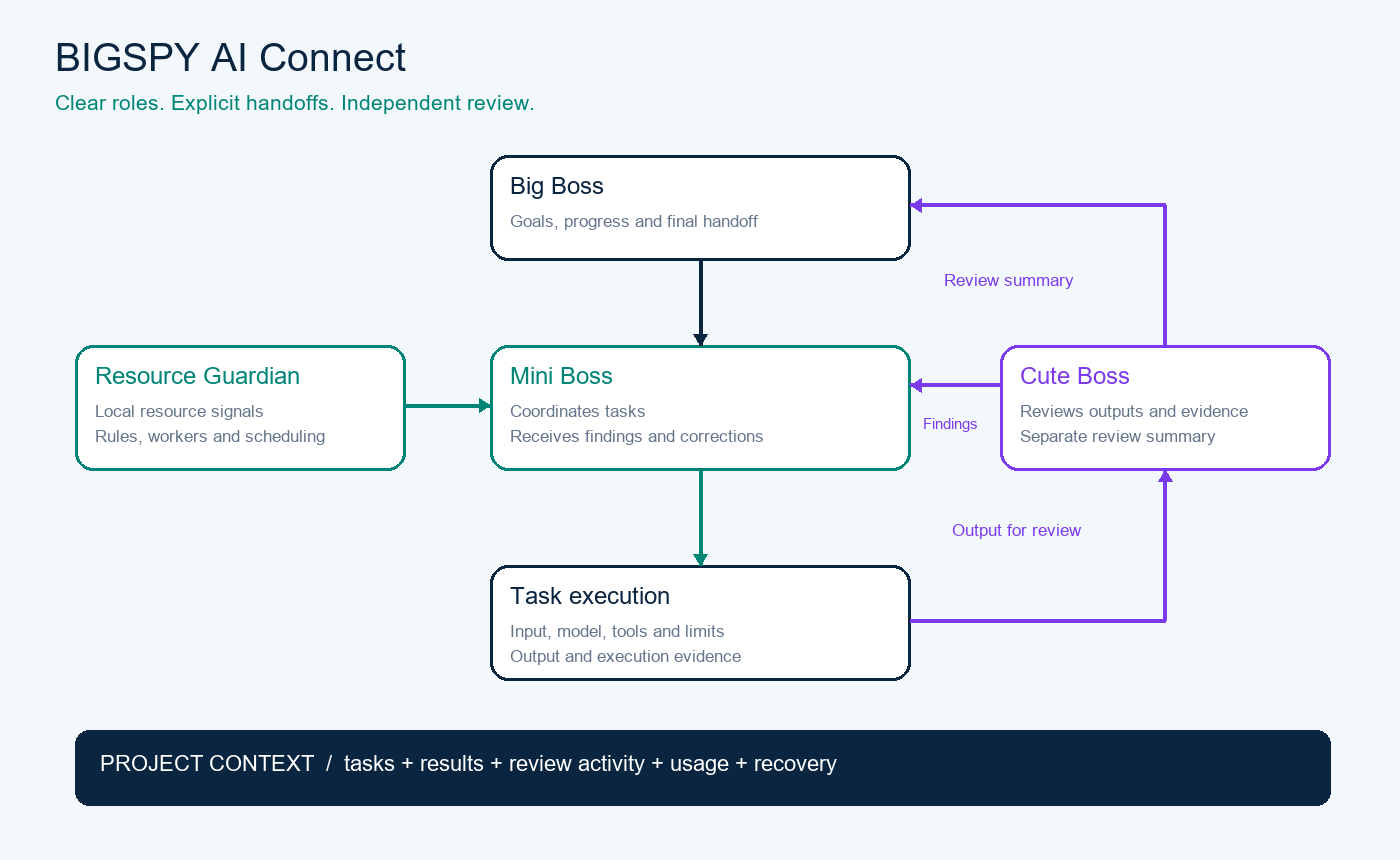
The architecture separates responsibility so that receiving a request, coordinating work, and reviewing an answer are understandable activities. These names describe roles in the product. They do not imply that every role has unlimited autonomy, tools, or access to your computer.
Big Boss: your point of contact
Big Boss is the overall communication role. The native Windows popup gives you a separate place to send requests and receive handoffs while the main workspace remains available. You can show or hide the popup without treating that action as task cancellation. In the intended architecture, Big Boss receives the work output and a separate review summary, helping you see both the result and what was checked.
Mini Boss: context and coordination
Mini Boss connects the project context with its tasks. The text preview routes review findings into bounded revisions, while the broader roadmap adds planning, assignments, dependency handling, and capability-based routing. Keeping Mini Boss sessions separate helps preserve the relationship between the goal and the work. Switching views should not silently merge unrelated tasks or turn a new requirement into permission for a different action.
Cute Boss: an independent look at the result
Cute Boss compares the answer with the request and returns findings for correction. Its activity report is separate from the actual work output. That distinction matters: a useful answer and a completed review are different things. An inconclusive review, a provider error, or exhausted limits can leave a result that needs your decision. Review can improve visibility, but it is not a guarantee that every factual or technical error will be detected.
03 / PROJECT CONTEXT
Organize AI Connect projects and task work
Projects, sessions and task tabs
The workspace is built around a sidebar, Mini Boss sessions, and a task area. A project keeps related work together; each task maintains its own input and output history. This arrangement is useful when you compare ideas, revise a draft, or work through several related questions. The interface gives you a place to return to the relevant task instead of relying on a long, mixed conversation to hold every detail.
Continue the conversation without losing its destination
The preview engine accepts additional input and processes input in order within a task. Keeping the destination explicit helps you understand which request a result belongs to. The roadmap expands this with requirement versions, safe checkpoints, and richer routing between existing and new tasks. Closing a view and cancelling execution are separate concepts, so a cleaner workspace should not be mistaken for a request to discard the underlying work.
A workspace that fits your preferences
English and Vietnamese interface options, agent reply language settings, and light or dark appearance help you work in a familiar environment. The desktop popup and main workspace serve different purposes: one offers a compact communication surface, while the other provides the task context. Local persistence and backup tools support continuity when you return to the application.
04 / INDEPENDENT REVIEW
The AI Connect execution and review loop
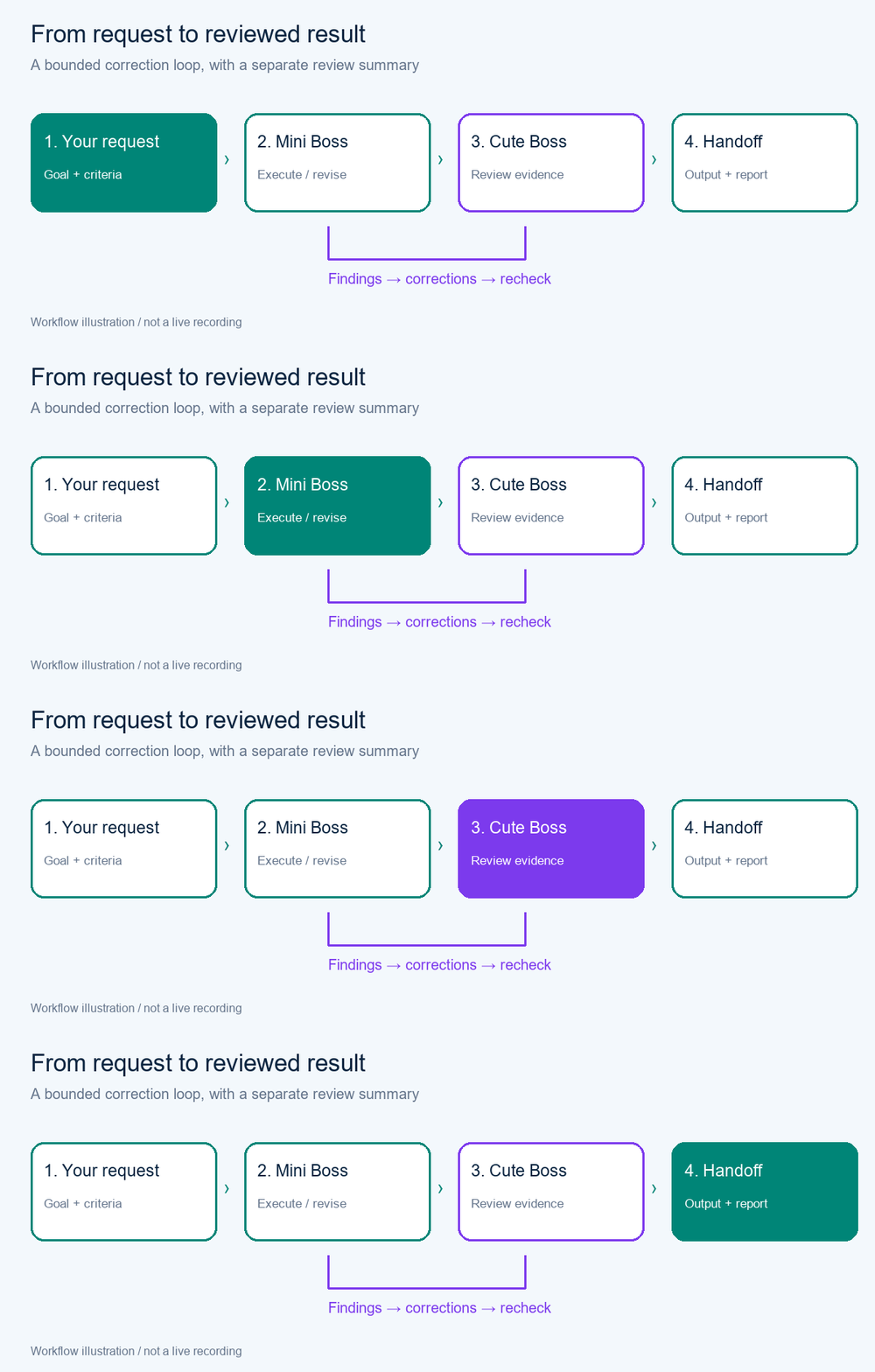
A useful AI workflow needs more than an answer. It also needs a way to inspect that answer against the original request. BIGSPY AI Connect combines text generation with a review-and-correction loop, keeping the work output and review activity visible together.
Generate, inspect, revise and recheck
First, the task receives your input through the selected connection. Cute Boss then checks the answer against the request. When review findings call for correction, the work returns for revision and another review. The animated diagram below explains this sequence; it is an illustration of the workflow, not a recording of a live task or a promise of automatic completion for every kind of project.
Know when the loop needs you
Review rounds and token thresholds provide stopping points. These thresholds are checked between calls and should not be understood as a hard monetary cap on every provider request. Missing usage data, an unreadable reviewer response, or an inconclusive result can require your decision. The application preserves the answer and shows review information, allowing you to inspect the situation rather than assuming that execution completion means the result has passed review.
05 / MODEL CONNECTIONS
Choose AI models and connections for your tasks
Provider connections with explicit readiness
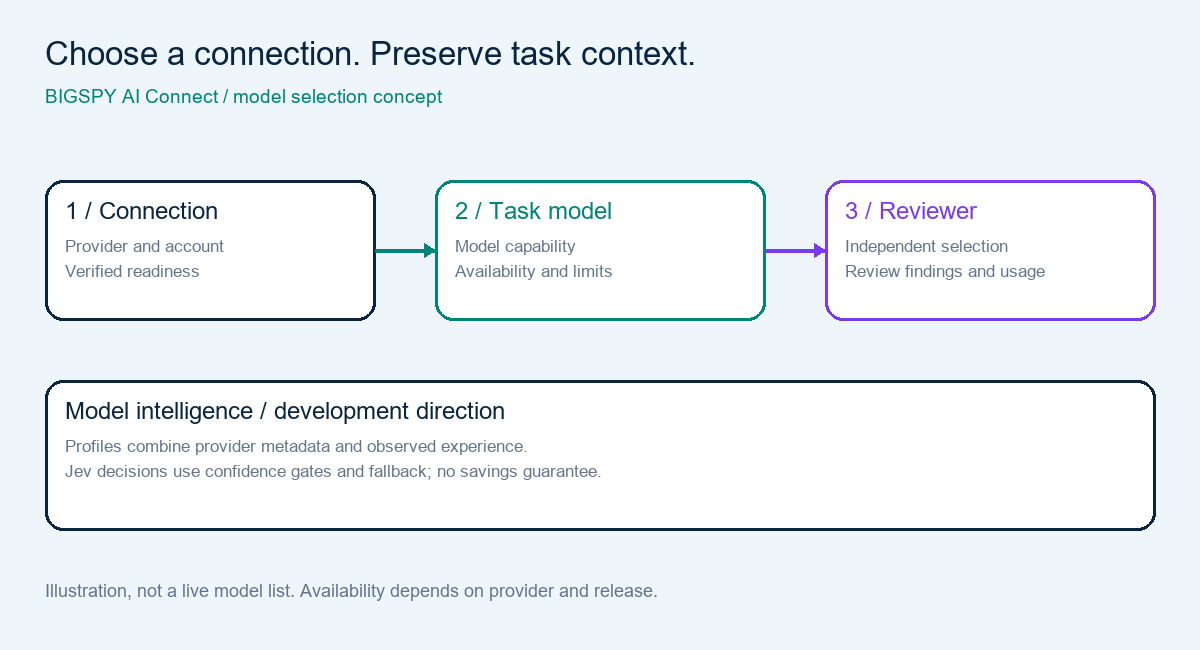
The preview offers separate API connection cards for providers including Kyma, OpenAI, Anthropic, Gemini, OpenRouter, Groq, and Ollama Cloud, alongside compatible API options. A configuration card is not proof that a model is usable with your account. Availability depends on credentials, provider access, supported models, quotas, and a successful connection check. Provider and subscription costs are separate from the desktop workspace.
Task connections and an independent reviewer
Connections can be associated with tasks so that changing a default does not silently reroute previous work. Cute Boss can use a separately configured reviewer connection where supported. ChatGPT and Claude plan bridges use the official CLIs and depend on the relevant account and integration conditions. They should not be presented as a universal replacement for API billing or as support for every tool offered by the native applications.
Model profiles and Jev in the development roadmap
The roadmap introduces model capability profiles that combine provider metadata with observed task experience, such as review outcomes, correction rounds, latency, errors, and reported usage. Jev is a fast decision layer with confidence gates, shadow operation, and fallback paths. These source-preview directions are intended to make selection more informed. Their availability in a public installer must be checked against release notes; no savings or quality improvement is guaranteed.
06 / LOCAL CONTROL
Local resources, data and Telegram communication
Resource Guardian works through local rules
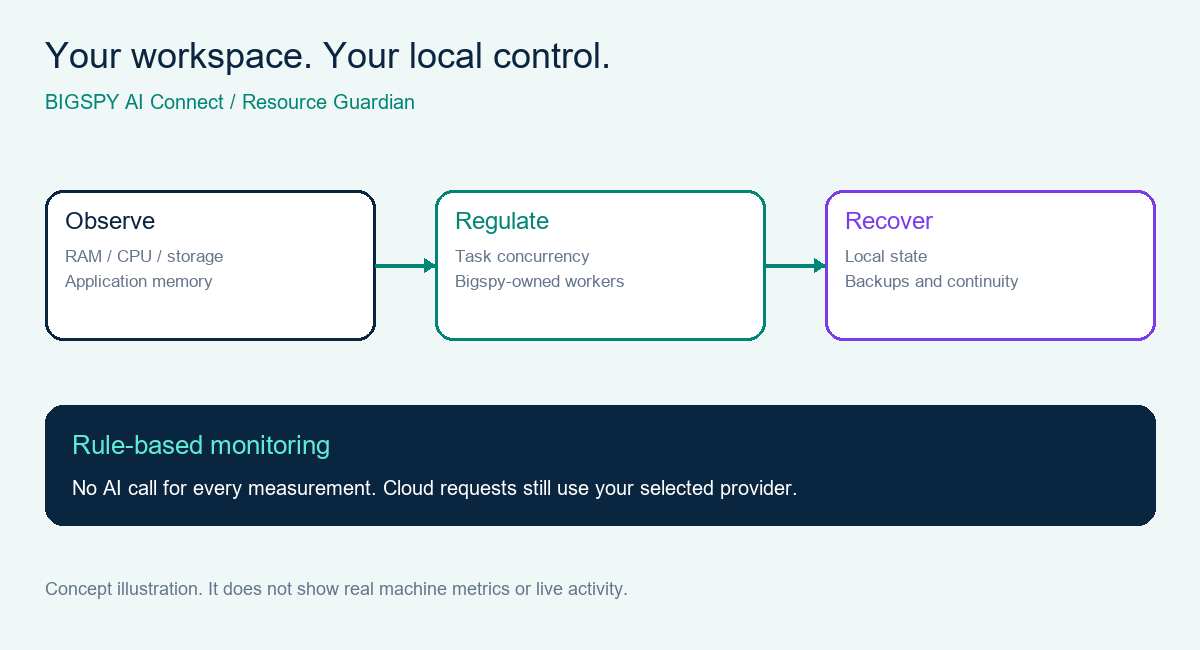
Resource Guardian measures supported machine indicators, including RAM, CPU, storage availability, and application memory. It regulates new task scheduling under resource pressure and tracks Bigspy-owned workers. The monitoring service follows local rules rather than making an AI call for every measurement. Its role is to manage the application’s execution footprint, not to close unrelated applications or inspect every file on your computer.
Local-first does not mean entirely offline
The Windows application keeps local task context and state, while cloud requests are processed by the selected AI provider. Configuration and consent determine what can be sent through a connection. Local backup and recovery help preserve desktop continuity, but users still need to understand their provider’s processing conditions. Secrets, login sessions, and credentials are not ordinary project knowledge to share between tasks.
The same workflow through Telegram private chat
The preview supports a paired private Telegram text channel for requests, project selection, status and results. Telegram is a communication channel for the desktop engine rather than a second independent Big Boss. The computer, application and Internet connection must remain running. Richer image, file and voice input, formatted result delivery, and always-on remote infrastructure are separate roadmap directions.
07 / PRODUCT DIRECTION
BIGSPY AI Connect roadmap: from preview to coordinated work
The roadmap grows the product in stages, with acceptance evidence for individual capabilities. Public downloads and release notes tell you what has shipped. Source changes may be awaiting real-account validation, and design items may still be planned. This distinction helps you evaluate AI Connect on its present capabilities while understanding where development is heading.
AI Connect capability map
Projects → sessions → tasks
Providers → models → readiness
Output → findings → recheck
Resources → workers → recovery
Profiles → decisions → feedback
Artifacts → scoped sharing → handoff
Concept map includes development directions, not only shipped capabilities.
Shared project knowledge and richer handoffs
The intended project knowledge board links artifacts, summaries, versions and origins so related tasks can reuse accepted information. Proposed shared content goes through review and acceptance before becoming common project knowledge. Cross-project access is scoped and requires authorization. Planned outputs include formatted chat, tables, diagrams and downloadable artifacts, with review summaries separate from the work product.
Broader tools and controlled improvements
Further stages address task readiness, tool permissions, more complete orchestration, and controlled self-improvement through reviewable changes. Browser and terminal capabilities have their own permission boundaries and release status. The product direction favors evidence, limits and user decisions over an unqualified promise to automate every task. The public release repository remains the place to check downloads and version-specific changes.
08 / QUESTIONS & ANSWERS
Frequently asked questions about BIGSPY AI Connect
What is BIGSPY AI Connect used for?
BIGSPY AI Connect organizes AI-assisted work in a Windows desktop workspace. It brings projects, task conversations, supported model connections and review history together. The preview is especially suited to exploring text tasks with bounded review; the broader orchestration vision is still developing.
Is AI Connect a browser-based service?
The product described here is a Windows desktop application. The native Big Boss popup requires the installed application and its bridge. This introduction page explains the product and links to public releases; it does not run your desktop tasks inside the website.
Does Cute Boss guarantee a correct answer?
No. Cute Boss adds independent review and visible findings, but AI review can miss problems or raise incorrect concerns. Inspect important results and their evidence yourself. The review summary helps you understand the checking activity and whether further decisions are needed.
Can I use my own model connections?
The preview supports configured provider API connections and selected official CLI plan bridges. You need an eligible account, the required permissions, and a successful connection check. Supported capabilities vary by provider and release, so check the setup guidance before relying on a particular model.
Will Telegram work when my computer is off?
No. The current communication channel depends on the local desktop engine. Your computer, BIGSPY AI Connect and Internet connection must remain active. Hiding the Big Boss popup does not mean the application has stopped, but closing the desktop engine stops its local execution.
Where can I download AI Connect and follow updates?
Use the public BIGSPY AI Connect release repository linked below. Review its installation information and release notes for the available Windows downloads. The public release page is separate from the developer source repository and is the destination used by this page’s download buttons.
Explore the BIGSPY AI Connect Windows preview
Bring your next AI task into a workspace where its context, answer and review history belong together. Check the public releases, choose the available Windows download, and read the version-specific setup information before you begin.
AI Connect downloads & release notes ↗Questions or collaboration? contact@bigspyai.com